
Dominion Questions, Answered Properly
Sartaba Dominion is our own design, so every question about it lands here sooner or later. These are the ones we hear most, answered fully. Tap any question to open its answer. For the complete rulebook with diagrams, see our Dominion rules guide.
Last updated:
Rules Questions
Who goes first?
Green always moves first, and turns alternate from there. Against the AI you choose which side it plays, and in an online game the creator picks a side and the friend automatically takes the other. The first move advantage is genuinely small, because the armies start far apart and the opening turns are about claiming neutral ground rather than fighting.
How are pawns eliminated?
Three ways, and knowing all three is half the game. First, a push with no escape. A pushed pawn retreats one hex directly away from the attacker, and if that hex is off the board, occupied by any piece, or blocked by a Nexus, Flag, or active objective tile, the pawn dies instead of retreating. Second, Strength depletion. Every push costs the defender 0.33 Strength, a disconnected pawn drains 0.5 per round, and any pawn that hits zero is removed. Third, encirclement. A pawn whose every neighboring hex holds an enemy pawn is eliminated instantly, no push required.
Why can I not push that pawn?
The push threshold is one and a half times the defender's Strength, and you have not reached it. Your attacker counts its own Strength plus the Strength of every friendly supplied pawn that stands adjacent to both the attacker and the defender. Two fresh pawns at 1.0 each cannot push one another, which surprises every new player once. Bring a supporting pawn into the wedge position, or grow your attacker by capturing territory first. The board does the arithmetic for you. Green arrows mark legal pushes with the combined Strength shown, and red dashed arrows mark enemies still out of reach. Two more limits apply. A pawn cut off from supply cannot push at all, and a pawn linked to an objective cannot be pushed.
What are the hidden tiles with the question marks?
Those are the two Flags, placed at random spots in the middle band of the map each game. Pawns never enter a Flag tile. Instead, a pawn standing beside a hidden tile spends a turn linking to it, which reveals the Flag and starts stabilization. Hold more adjacent pawns than your opponent for four rounds and the Flag is yours. From then on it supplies your army exactly like a second Nexus, which is why the fight over the Flags usually decides the midgame. The rules page walks through the whole sequence with diagrams.
What does the strength bar mean?
The vertical bar on a pawn's left side is its current Strength, with the exact value printed underneath. The color reads at a glance. Red means below 1.0, a pawn one shove from death. Yellow is the normal range up to 2.5. Green means above 2.5, a veteran that can push most enemies unassisted. Strength starts at 1.0 and grows by conquest, 0.10 per neutral tile and 0.50 per enemy tile, up to a permanent cap of 4.0. On top of that, a supplied pawn carries a distance bonus of up to 3.0 for operating far from its anchors, so a deep raider can fight at up to 7.0 effective Strength.
Why is my pawn losing Strength every round?
It is cut off. A pawn is supplied only while an unbroken chain of your own tiles connects it to your Nexus or to a Flag you have captured. Somewhere behind that pawn, the chain broke, usually because an enemy pawn stepped onto a narrow corridor or a friendly pawn died and its territory collapsed. A disconnected pawn drains 0.5 Strength per full round, loses its distance bonus at once, and can neither push nor grow. March it back toward your color or clear the tile that broke the line. The dotted supply routes on the board show exactly where each pawn's lifeline runs.
Does Strength come back when I reconnect?
No, and this rule shapes the whole game. Reconnecting stops the drain, but nothing is refunded. Permanent Strength rises only through new conquest while supplied. The distance bonus does reappear as the pawn moves, because it is recalculated from position every turn, but drained permanent Strength is spent forever. A rescued pawn is a survivor, not a restored one, so the cheapest way to handle disconnection is to never let it happen.
What do captured Flags actually do?
A captured Flag is a supply anchor, functionally a second Nexus. Everything connected to it is fully supplied even with no path back to your home corner, which is what lets an offensive live deep in enemy territory. Flags change hands, though. If your opponent holds more adjacent pawns around your Flag than you do, a four round recapture clock starts, and matching their count resets it. A Flag whose every neighboring hex is occupied by enemy pawns flips instantly. Garrison accordingly.
How do I capture the Nexus, and how do I defend mine?
The Nexus falls only to siege. Bring more supplied pawns adjacent to it than the defender has, then spend a turn attacking it with one of them. Each round of maintained superiority advances the siege, and five successful rounds capture the fortress and win the game on the spot. Standing next to it does nothing by itself. You must spend the turns. Defense mirrors this exactly. The moment the defender matches the attackers' adjacent count, all progress resets to zero, which makes one returning pawn a devastating answer to a five round investment. Keep a defender within marching distance of home and the siege becomes a very expensive proposition.
How does a game end? Is there a draw?
Two ways only. Eliminate every enemy pawn, or capture the enemy Nexus. There is no draw in Dominion. Pawns never respawn, disconnected pawns drain away, and the map keeps flipping territory, so every game grinds to a decision. Wins are ranked on the Dominion leaderboard, and beating higher AI levels earns more.
Getting Better
What difficulty should I start at?
Levels 1 and 2 if the game is new to you. They chase tiles, wander into bad pushes, and leave their corridors hanging, exactly the mistakes you need to practice punishing while the supply instinct forms. Level 3 plays a solid, considered game and is the default. Levels 4 and 5 search deeper, protect their lines, and take noticeably longer to move because they are examining much more of the board. These top two levels require a free account to play. Move up when you win more than half your games, and remember the leaderboard pays more for wins against the stronger levels.
What is the most common beginner mistake?
Marching pawns out alone. A lone pawn cannot push anything its own size, cannot stabilize a Flag against company, and stretches a thin corridor behind it that begs to be cut. The fix is one habit. Move in loose pairs, keep the trail behind you at least two tiles wide where it matters, and glance at your dotted supply lines before every advance. Our strategy guide builds the whole game plan from these ideas.
Playing Here
Can I play Dominion online here for free?
Yes. The game runs in your browser with nothing to install and no account needed for casual play. Three ways to play. Against a friend on the same screen, against a friend anywhere in the world by sharing a short game code, or against SartabaAI at five levels. A free account is optional and adds saved statistics, a spot on the Dominion leaderboard, and access to AI levels 4 and 5.
How do I start a game against the AI?
Everything happens in the quick setup panel on the Dominion page. The numbers below match the numbers on the screenshot.
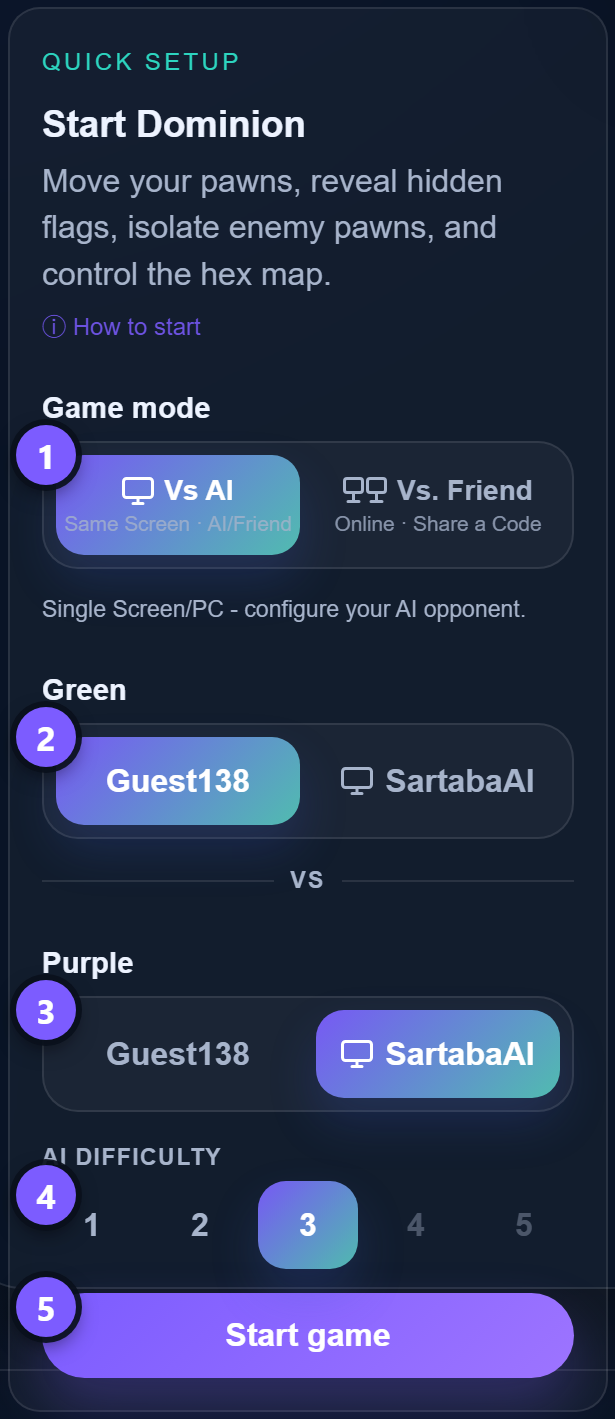
- Make sure the game mode is set to Vs AI (same screen). It is the default, so usually there is nothing to do here.
- Choose who controls Green, yourself or SartabaAI. Remember Green moves first.
- Choose who controls Purple the same way. One side belongs to the AI, and if you hand it the other side instead, the first side automatically becomes yours.
- Pick the AI difficulty, from 1 (relaxed) to 5 (ruthless). Levels 4 and 5 need a free account.
- Press Start game and make your first move.
Two details worth knowing. You can change the difficulty between games as you improve, and if you set both sides to human, the same screen becomes a board for two, with a friend beside you commanding the other army.
How can I invite a friend to play?
Playing against a friend takes one player creating the game and one player joining it. The numbers below match the numbers on the screenshot.
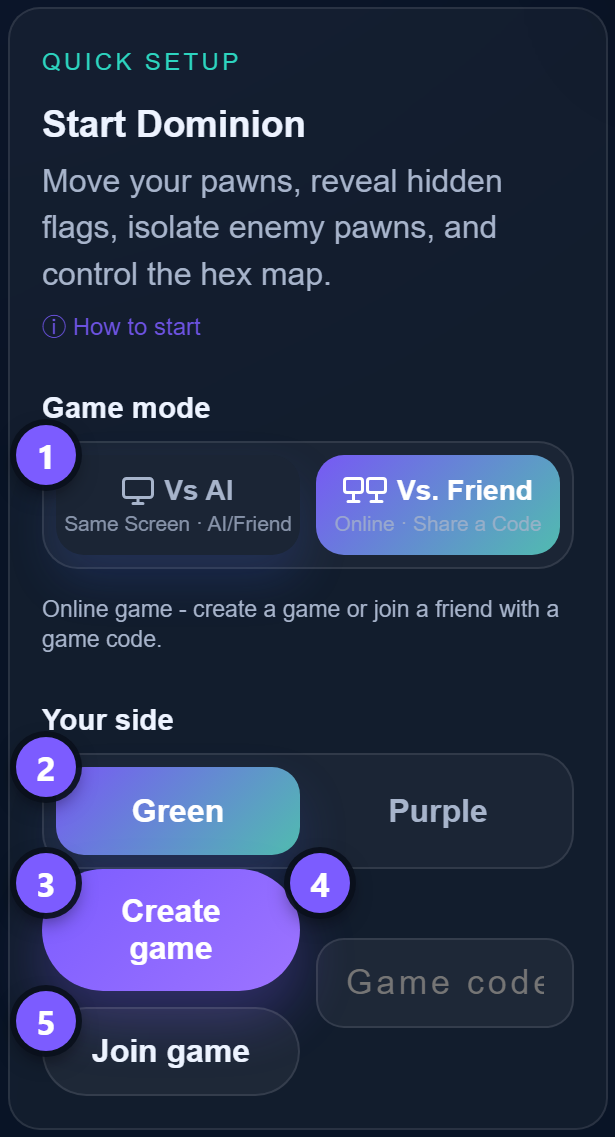
- Switch the game mode to Vs. Friend (online, share a code). Both players do this.
- As the creator, pick your side, Green or Purple. Your friend automatically gets the other one.
- Press Create game. A 6 digit game code appears. Send it to your friend however you like.
- Your friend types that code into the game code box.
- Your friend presses Join game, and the match starts the moment the connection is made.
The creator sets all the game options, so the joining player does not need to touch the setup at all. The same flow works in every game on the site, not just Dominion.
Can I review or save a game?
Yes. The move history panel beside the board records every move, push, Flag event, and siege tick as the game happens, and you can click back through it to review earlier positions. When a game ends, the Download Game option exports a video replay. Watching your own collapse in replay is the fastest teacher this game has. Find the turn your corridor became cuttable and you will not repeat it.
Still have a question?
Send it through our contact page. Dominion is our own design, so player questions directly shape both this FAQ and the game itself. We read everything.